


SickKids Research Institute
Driving clinical impact with every
research question
The SickKids Research Institute (RI) is Canada’s largest, hospital-based child health research institute conducting and translating groundbreaking research, training the next generation of researchers, and supporting global scientific communities with knowledge and state-of-the-art facilities.
We’re taking more discoveries from the lab bench to the bedside, making a bigger impact on children’s lives around the world, sooner.

274 scientists

Over 1,300 research trainees

380 project & team investigators

1,253 research support staff

$322.6M research spend

2,849 publications

#1 research intensive hospital in Canada

#1 paediatric hospital in the world
Explore the Institute
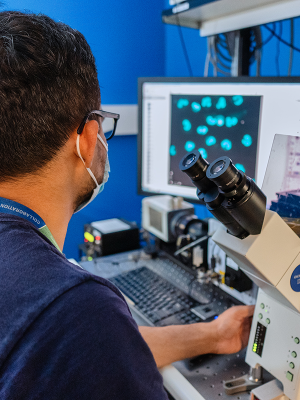
Discover world-class facilities
Enhance the scope and quality of your research. Conduct your studies in a world-class setting equipped with new technologies and infrastructure – check out our facilities and learn what our distinct research design services can offer you.
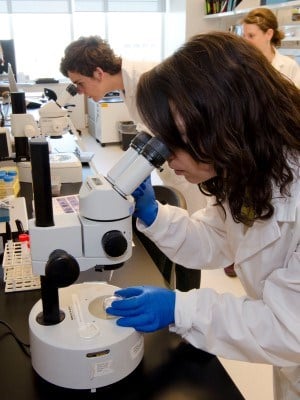
Work alongside renowned researchers
The Research Training Centre (RTC) offers trainees hands-on opportunities to contribute to some of the most important research projects in Canada and to work with top scientists.
Explore leading edge research
Across our seven research programs, clinician scientists and researchers are conducting ground-breaking research to improve child health outcomes, policy and clinical care.
Bridging research and care


Latest research news

June 8, 2026
Powering precision: How next-gen computing is fueling scientific discovery at SickKids
Modernizing SickKids’ research infrastructure is enabling faster, innovative, and more secure research at SickKids and beyond.

May 27, 2026
John Rubinstein elected to prestigious Royal Society
SickKids scientist Dr. Rubinstein has been elected a Fellow of the Royal Society for pioneering revolutionary imaging techniques to explore the structure and function of biological molecules.

May 25, 2026
‘A monumental example of translational science’
Decades after Dr. Amu Sarkar discovered and freely shared his copper-based treatment for Menkes disease, the FDA has now officially approved it.

Research community
Discovery District
In the heart of Toronto’s Discovery District and affiliated with the University of Toronto, our scientists are steps away from Canada’s largest concentration of hospitals, research institutes, business incubators and venture capital organizations.
Innovation hub
Innovation hub
Our collaborative partnerships are key to uncovering the next breakthrough in child health research. With the support of Industry Partnerships & Commercialization (IP&C), our scientists help make Toronto one of the most innovative cities in the world.
Powered by diversity
At the SickKids Research Institute, you are part of a community that has come together from across the globe to advance innovative and impactful paediatric health research.
World-renowned research
From esteemed child health researcher Dr. Zulfiqar Bhutta (winner of the 2023 Henry G. Friesen International Prize in Health Research) to the 35 scientists currently holding Canada Research Chairs, we are leaders in child health research in Canada and around the world.





More from the Research Institute
Comprised of internationally-recognized leaders in research and innovation, the SickKids Scientific Advisory & Innovation Board (SAIB) supports and provides input on the overall strategic directions for the Research Institute.
Canada Research Chairs showcase the calibre and diversity of scientists and clinicians working at the SickKids Research Institute.
SickKids is home to 59 scientific and academic chairs. See who holds current chairs in Canada.
The SickKids Commercialization Advisory Board (CAB) is a group of experienced industry and investment leaders who provide strategic guidance to help advance SickKids innovations toward impact.
The SickKids Institutional Research Data Management (RDM) strategy outlines our commitment to fostering sound RDM practices and supporting researchers in following the FAIR principles to make data findable, accessible, interoperable and reusable.
Research Awards & Financial Services (RAFS) supports researchers through the grant lifecycle, from grant applications and contract management, to monitoring and financial reporting.

Contact the Research Institute
For inquiries about SickKids Research Institute, please email Jelena Djurkic, Manager, Communications (Research Institute & Strategic Initiatives), Communications & Public Affairs at jelena.djurkic@sickkids.ca.